

Most registry setups still rely on a long-lived password somewhere. A robot account secret pasted into GitHub Actions secrets. An imagePullSecret baked into a Kubernetes namespace. Each one is a credential you have to create, distribute, rotate, and hope it never leaks. It doesn’t have to be like this. The whole CI/CD pipeline, can go keyless from source to a production Kubernetes cluster, regardless of your build system, cloud, or on-prem stack.

Updated 2026-10-21 for Harbor v2.15.12 and later. The audience is now a field of the trusted issuer (the identity provider record), not a claim rule. Creating a trusted issuer without it is refused with audience is required, and claim rules on aud or iss are refused with 400. The API also moved from /api/v2.0/federated-idps to /api/v2.0/trusted-issuers (robots link with trusted_issuer_id). The snippets below show the current API. Upgrading an existing setup: see the v2.15.12 upgrade notes.
This guide sets the trust up once in Harbor, then walks each side with GitHub Actions and k3s as the concrete examples: keyless push from CI, then keyless pull on the cluster.
- CI: keyless push. GitHub Actions requests an OIDC token and logs in to Harbor with it. No registry password in GitHub secrets.
- CD: keyless pull. A kubelet credential provider hands the kubelet a ServiceAccount token and returns it as the registry password. Pods run with no
imagePullSecrets.
Harbor’s federated trust is not limited to those tools. Anywhere a workload already receives a short-lived identity token, that platform can be a trust source for Harbor: CI systems like GitHub Actions, Forgejo CI, and GitLab CI, and hyperscaler compute like AWS (EC2, ECS), Azure (Virtual Machines, Container Apps), and Google Cloud (Compute Engine, Cloud Run). On the GitOps side, OCI artifact pulls are getting the same keyless treatment in FluxCD (see RFC #5681), though ArgoCD does not support it yet.

The kubelet can pull images with a short-lived ServiceAccount token instead of a stored secret (Kubernetes 1.33+, KEP-4412), and GitHub Actions and GitLab CI already mint the same kind of token for push. Harbor’s Federated Identity Provider trusts those issuers and maps each token to a robot account. Set the trust up once, and both push and pull go keyless, with nothing to rotate.
How the Trust Works
A Federated Identity Provider in Harbor is a record of an external OIDC issuer that Harbor trusts. It holds the issuer URL, the audience its tokens must carry, the signing keys (JWKS), and a set of claim rules that decide which incoming tokens map to which robot account. In the API this record is called a trusted issuer.
When a client authenticates, it presents a JWT as the Basic-auth password. The username is not used for authentication, so any value works (the Kubernetes credential provider uses jwt):
echo "$TOKEN" | docker login -u jwt --password-stdin harbor.example.comHarbor’s robotjwt middleware then:
- Reads the
issandaudclaims and finds the trusted issuer registered for that issuer URL and audience. Several trusted issuers may share an issuer URL as long as their audiences differ. - Verifies the JWT signature against that trusted issuer’s JWKS, and checks
exp. - Matches the remaining claims against the configured claim rules to select a robot account.
- Authorizes the request with that robot’s permissions.
Because the token is signed by an issuer Harbor already trusts, and the claims pin down exactly which workload it is, there is nothing static to steal. The token typically lives only a few minutes.
Global and Project-Scoped Providers
Harbor exposes Federated Identity Providers at two scopes, and it helps to know which one you are using before you start.
- System-level (global). A Harbor administrator registers an identity provider and federated robots at the system level, and they apply across the whole instance. This is the default scope.
- Project-scoped. A project administrator registers providers and federated robots that belong to a single project, without needing system-admin rights. Trust configuration then lives next to the project that owns the images.
The project-scoped path is gated behind a system setting that is off by default. Enable it once, as an administrator, before creating any project-level federated robot:
curl -u admin:Harbor12345 -X PUT https://harbor.example.com/api/v2.0/configurations \
  -H 'Content-Type: application/json' \
  -d '{"enable_project_federated_robot_accounts": true}'
In the UI the same toggle is under Administration > Configuration.

Skip this and the robot-creation calls below fail with 403 "project-level federated robot accounts feature is not enabled". Everything in this post creates project-level robots ("level": "project"), so flip it on first.
A Word on the Audience Claim
This post uses harbor.example.com as the audience, but aud is not required to be a domain name. It is a free-form string identifying who the token is for; the registry hostname is just a handy convention that also stops the token being accepted elsewhere. Any string works as long as the same value is set on both ends: the token request and the Audience field of the trusted issuer in Harbor. The match is exact, scheme included, so a token requested for https://harbor.example.com does not match a trusted issuer whose audience is harbor.example.com. The audience can be set only once. A wrong value means deleting and recreating the trusted issuer, and Harbor refuses to delete a trusted issuer while federated robots are attached, so those robots have to be deleted and recreated as well.
CI Side With Keyless Push From GitHub Actions
GitHub Actions can mint an OIDC token for any workflow that asks for it. You request the id-token: write permission, fetch a token scoped to your registry’s audience, and log in to Harbor with it. There is no registry password anywhere in the repository or its secrets.
Register the GitHub Identity Provider in Harbor
Create a Federated Identity Provider pointing at GitHub’s OIDC issuer. GitHub publishes a standard OpenID discovery document, so Harbor can discover the issuer and JWKS automatically (an “online” identity provider):
OpenID configuration URL: https://token.actions.githubusercontent.com/.well-known/openid-configuration
Issuer:                   https://token.actions.githubusercontent.com   (discovered)
JWKS URI:                 discovered automatically
Audience:                 harbor.example.com                            (required, set once)
Over the REST API:
curl -u admin:Harbor12345 -X POST https://harbor.example.com/api/v2.0/trusted-issuers \
  -H 'Content-Type: application/json' \
  -d '{
    "name": "github-actions",
    "openid_config_url": "https://token.actions.githubusercontent.com/.well-known/openid-configuration",
    "audience": "harbor.example.com"
  }'
Then create a federated robot account with pull and push permission on your target project, and attach a claim rule so that only your repository’s tokens map to it:
repository == myorg/myrepoiss and aud are not claim rules. The trusted issuer already pins both, and a claim rule on either is refused with 400.
A federated robot is created exactly like a normal robot, except it is linked to an identity provider and carries no static secret. Over the REST API the create call posts to /api/v2.0/robots with a trusted_issuer_id field:
curl -u admin:Harbor12345 -X POST https://harbor.example.com/api/v2.0/robots \
  -H 'Content-Type: application/json' \
  -d '{
    "name": "gh-push",
    "duration": -1,
    "level": "project",
    "trusted_issuer_id": 1,
    "permissions": [
      {
        "kind": "project",
        "namespace": "library",
        "access": [
          {"resource": "repository", "action": "pull"},
          {"resource": "repository", "action": "push"}
        ]
      }
    ]
  }'
The response contains no secret. That is the point: the robot has no password, only a set of claim rules that decide which JWTs are allowed to act as it.
Claim rules are managed under the trusted issuer. A trusted-issuer-level rule (one that applies to any robot on that issuer) uses robot_id: 0; a rule scoped to one robot uses that robot’s ID:
curl -u admin:Harbor12345 -X POST \
  https://harbor.example.com/api/v2.0/trusted-issuers/1/claims \
  -H 'Content-Type: application/json' \
  -d '{
    "rules": [
      {"trusted_issuer_id": 1, "robot_id": 0, "claim_path": "repository", "value": "myorg/myrepo"}
    ]
  }'
The Workflow
The workflow needs id-token: write. It fetches a token whose audience matches the value you configured in Harbor, then uses it as the docker login password:
name: Build and push (keyless)

on:
  workflow_dispatch:

jobs:
  build-and-push:
    runs-on: ubuntu-latest
    permissions:
      id-token: write   # required to mint an OIDC token
      contents: read

    steps:
      - name: Checkout
        uses: actions/checkout@v4

      - name: Get OIDC token
        run: |
          RESPONSE=$(curl -s -H "Authorization: bearer $ACTIONS_ID_TOKEN_REQUEST_TOKEN" \
            "${ACTIONS_ID_TOKEN_REQUEST_URL}&audience=harbor.example.com")
          TOKEN=$(echo "$RESPONSE" | jq -r '.value')
          echo "TOKEN=$TOKEN" >> "$GITHUB_ENV"

      - name: Build and push
        run: |
          echo "$TOKEN" | docker login -u jwt --password-stdin harbor.example.com
          docker build -t harbor.example.com/library/app:${{ github.sha }} .
          docker push harbor.example.com/library/app:${{ github.sha }}
No secrets.REGISTRY_PASSWORD. The only thing that authenticates this push is a token GitHub mints at run time and Harbor verifies against GitHub’s public keys. The repository claim in that token (myorg/myrepo) is what the claim rule matches, so a workflow in any other repository, even with id-token: write, gets a token that maps to nothing and is rejected.
You can inspect what GitHub puts in the token by base64-decoding the payload segment during a run. The claims that matter for Harbor are:
| Claim | Example value |
|---|---|
iss | https://token.actions.githubusercontent.com |
aud | harbor.example.com |
repository | myorg/myrepo |
repository_owner | myorg |
ref | refs/heads/main |
iss and aud select the trusted issuer. Every other claim can become a claim rule, so you can scope a robot down to a single repository, a single owner, or a single branch.
CD Side With Keyless Pull on K8s
The pull side is the mirror image. A Kubernetes cluster is itself an OIDC issuer: it signs the ServiceAccount tokens it hands to pods, and it publishes the matching public keys. If Harbor trusts that issuer, a node can pull images using nothing but a ServiceAccount token. No imagePullSecret, no robot secret on the cluster.
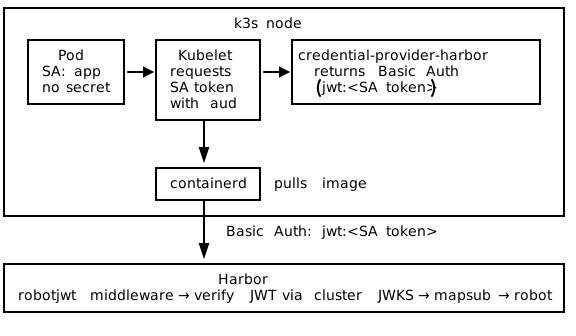
The mechanism is KEP-4412: the kubelet asks the API server for a ServiceAccount token scoped to your registry’s audience, hands it to a credential provider plugin, and the plugin returns Basic-auth credentials (username=jwt, password=<the token>). The kubelet uses those to pull. The plugin that ships this for Harbor is credential-provider-harbor.
Requirements
The KEP-4412 path relies on two kubelet feature gates: KubeletServiceAccountTokenForCredentialProviders and ServiceAccountNodeAudienceRestriction. They are default-on in Kubernetes 1.34. On 1.33 they exist but must be enabled explicitly. A current k3s release ships a recent enough kubelet; this post uses v1.34.x so both gates are on by default.
This is the k3s contrast worth calling out up front. On an immutable distribution like Talos, you would have to bake the credential provider binary into a system extension and reboot the node. On k3s the kubelet is an ordinary process managed by systemd, and k3s reads plain config files from disk, so the whole thing installs as a privileged DaemonSet that drops files on the host and restarts the k3s service. No custom node image, no reboot.
Step 1: Tell the API Server Which Audiences Nodes May Request
ServiceAccountNodeAudienceRestriction means a node can only request a ServiceAccount token for an audience that is both (a) in the API server’s --api-audiences list and (b) granted to system:nodes via RBAC. Configure the audience on the k3s server in /etc/rancher/k3s/config.yaml:
# /etc/rancher/k3s/config.yaml  (on the k3s server node)
kube-apiserver-arg:
  - "api-audiences=https://kubernetes.default.svc.cluster.local,harbor.example.com"
Keep the default cluster audience (https://kubernetes.default.svc.cluster.local) in the list and append your registry audience. Restart k3s on the server for the flag to take effect:
sudo systemctl restart k3sStep 2: Register the Cluster as an Identity Provider in Harbor
Harbor needs the cluster’s issuer and signing keys. Pull both from the cluster:
# Cluster issuer
kubectl get --raw /.well-known/openid-configuration | jq -r .issuer

# Cluster JWKS (the public keys Harbor verifies tokens against)
kubectl get --raw /openid/v1/jwks | jq .
For a k3s cluster the issuer is typically https://kubernetes.default.svc.cluster.local. Since that URL is not reachable from outside the cluster, register an offline identity provider: paste the JWKS directly into Harbor rather than having Harbor fetch it over the network. Over the REST API:
curl -u admin:Harbor12345 -X POST https://harbor.example.com/api/v2.0/trusted-issuers \
  -H 'Content-Type: application/json' \
  -d '{
    "name": "k3s-cluster",
    "description": "k3s service account issuer",
    "issuer": "https://kubernetes.default.svc.cluster.local",
    "audience": "harbor.example.com",
    "offline_validation": true,
    "jwks_keys": '"$(kubectl get --raw /openid/v1/jwks)"',
    "supported_algorithms": ["RS256"]
  }'
Then create a federated robot with pull permission and a claim rule on the sub claim. A Kubernetes ServiceAccount token’s sub is system:serviceaccount:<namespace>:<serviceaccount>:
# Robot with pull permission, linked to the cluster trusted issuer (id 2 here)
curl -u admin:Harbor12345 -X POST https://harbor.example.com/api/v2.0/robots \
  -H 'Content-Type: application/json' \
  -d '{
    "name": "k3s-pull",
    "duration": -1,
    "level": "project",
    "trusted_issuer_id": 2,
    "permissions": [
      {
        "kind": "project",
        "namespace": "library",
        "access": [
          {"resource": "repository", "action": "pull"},
          {"resource": "repository", "action": "list"}
        ]
      }
    ]
  }'

# Claim rule: only the "app" SA in the "default" namespace maps to this robot
curl -u admin:Harbor12345 -X POST \
  https://harbor.example.com/api/v2.0/trusted-issuers/2/claims \
  -H 'Content-Type: application/json' \
  -d '{
    "rules": [
      {"trusted_issuer_id": 2, "robot_id": 0, "claim_path": "sub",
       "value": "system:serviceaccount:default:app"}
    ]
  }'
Use a broader value like system:serviceaccount:*:* only if you intentionally want any ServiceAccount in the cluster to map to the robot. Scoping sub to a specific namespace and ServiceAccount is the safer default.
A Kubernetes-issued token that reaches Harbor looks like this. Note the sub claim and the aud you requested:
{
  "aud": ["harbor.example.com"],
  "exp": 1764290604,
  "iat": 1764287004,
  "iss": "https://kubernetes.default.svc.cluster.local",
  "kubernetes.io": {
    "namespace": "default",
    "pod": { "name": "app-7d9f", "uid": "375b30f1-..." },
    "serviceaccount": { "name": "app", "uid": "c871d5a5-..." }
  },
  "sub": "system:serviceaccount:default:app"
}
Step 3: Install the Credential Provider on Every Node
The credential provider has to run on each node where pulls happen. The Helm chart does the full install: it runs a privileged DaemonSet that copies the binary onto the host, writes the kubelet CredentialProviderConfig, creates the node-audience RBAC, writes a k3s config drop-in pointing the kubelet at the provider, and restarts k3s.
helm upgrade --install credential-provider-harbor \
  oci://8gears.container-registry.com/8gcr/credential-provider-harbor \
  --namespace kube-system \
  --create-namespace \
  --set profile=k3s \
  --set registry.host=harbor.example.com \
  --set registry.audience=harbor.example.com
registry.audience defaults to registry.host when omitted, so if your audience is exactly your registry hostname you can leave it out. Set it explicitly when your audience string differs from the host (remember, aud is just a free-form string).
The k3s profile pins the k3s-specific paths. On the host the chart lays down:
| Item | k3s path |
|---|---|
| Provider binary | /var/lib/rancher/credentialprovider/bin/credential-provider-harbor |
| Provider config | /var/lib/rancher/credentialprovider/config.yaml |
| Kubelet config drop-in | /etc/rancher/k3s/config.yaml.d/99-credential-provider-harbor.yaml |
That drop-in is what wires the kubelet to the plugin. It sets the two kubelet knobs k3s forwards to its embedded kubelet:
# /etc/rancher/k3s/config.yaml.d/99-credential-provider-harbor.yaml  (written by the chart)
image-credential-provider-bin-dir: "/var/lib/rancher/credentialprovider/bin"
image-credential-provider-config: "/var/lib/rancher/credentialprovider/config.yaml"
The CredentialProviderConfig itself tells the kubelet which images trigger the plugin, and which audience to request a ServiceAccount token for:
# /var/lib/rancher/credentialprovider/config.yaml  (written by the chart)
kind: CredentialProviderConfig
apiVersion: kubelet.config.k8s.io/v1
providers:
  - name: credential-provider-harbor
    apiVersion: credentialprovider.kubelet.k8s.io/v1
    tokenAttributes:
      requireServiceAccount: true
      serviceAccountTokenAudience: "harbor.example.com"
      cacheType: Token
    matchImages:
      - "harbor.example.com"
    defaultCacheDuration: "1h"
    args:
      - "--username=jwt"
The chart also creates the node-audience RBAC required by ServiceAccountNodeAudienceRestriction (the --set nodeAudienceRbac.create default is true). It grants system:nodes the right to request ServiceAccount tokens for your audience:
apiVersion: rbac.authorization.k8s.io/v1
kind: ClusterRole
metadata:
  name: node-harbor-audience-token
rules:
  - verbs: ["request-serviceaccounts-token-audience"]
    apiGroups: [""]
    resources: ["harbor.example.com"]
---
apiVersion: rbac.authorization.k8s.io/v1
kind: ClusterRoleBinding
metadata:
  name: node-harbor-audience-token
roleRef:
  apiGroup: rbac.authorization.k8s.io
  kind: ClusterRole
  name: node-harbor-audience-token
subjects:
  - apiGroup: rbac.authorization.k8s.io
    kind: Group
    name: system:nodes
By default the chart restarts the k3s service after writing these files so the node is ready immediately. If you would rather roll nodes yourself, install with --set kubelet.restart=false and restart k3s on your own schedule.

If you prefer not to run the installer DaemonSet, the same two knobs can be set directly in the main /etc/rancher/k3s/config.yaml instead of the config.yaml.d/ drop-in, and the binary placed on each node by hand. The chart exists so you do not have to do that per node. See the project README for the manual install path.
Step 4: Pull With No imagePullSecret
Deploy a pod that references a Harbor image and a ServiceAccount, with no imagePullSecrets:
apiVersion: v1
kind: Pod
metadata:
  name: app
  namespace: default
spec:
  serviceAccountName: app
  containers:
    - name: app
      image: harbor.example.com/library/app:latest
      imagePullPolicy: Always
The kubelet sees the harbor.example.com image, matches it against matchImages, requests a ServiceAccount token for the harbor.example.com audience, and invokes the plugin. The plugin returns jwt:<token>. Harbor verifies the token against the cluster JWKS, reads sub: system:serviceaccount:default:app, matches the claim rule, and authorizes the pull as the k3s-pull robot. KEP-4412 generates the token automatically, so the pod does not need a projected volume either.
When a Pull Fails
A few failure modes show up repeatedly. They map cleanly to the four things that have to line up.
| Symptom | Cause | Fix |
|---|---|---|
audience not found in pod spec volume | Node-audience RBAC missing | Ensure nodeAudienceRbac.create=true, or apply the ClusterRole/Binding above |
no robots matched your token | No robot with a matching claim rule | Create or fix the sub claim rule on the trusted issuer |
401 Unauthorized | JWKS mismatch or audience mismatch | Re-export the cluster JWKS into Harbor; confirm the token’s aud equals the trusted issuer’s audience exactly |
401, harbor-core logs trusted issuer <name> has no audience | Trusted issuer created before v2.15.12 without an audience | Set the audience once: PUT /api/v2.0/trusted-issuers/{id} with {"audience": "harbor.example.com"} |
no basic auth credentials | Kubelet never invoked the plugin | Confirm the k3s config drop-in is present and k3s was restarted |
The JWKS point is worth remembering operationally: recreating a cluster regenerates its signing keys, which invalidates the JWKS you pasted into Harbor. After a cluster rebuild, re-export /openid/v1/jwks and update the trusted issuer (PUT /api/v2.0/trusted-issuers/{id} with jwks_keys).
Why This Matters
This is what secretless actually means in practice. There is no registry password in a GitHub secret. There is no robot secret in a Kubernetes Secret. There is no imagePullSecret on any namespace or ServiceAccount. There is nothing to rotate, because every token the system uses is minted on demand and expires in minutes.
What you configure instead is trust and scope: which issuers Harbor believes, and which claims map to which robot. A leaked GitHub token is useless minutes later and only ever mapped to one repository’s robot. A node can only pull what its ServiceAccount’s sub claim is allowed to pull. The blast radius of any single credential shrinks to almost nothing because there is no durable credential to begin with.
This is the same zero-static-secret direction we took with Harbor on AWS, where RDS IAM and IRSA replaced database passwords and S3 keys with ephemeral tokens. Workload Identity Federation extends that idea to the registry’s own front door: the clients pushing and pulling images.
Try keyless Harbor on your next cluster.
8gears Container Registry is a Harbor-based container registry as a service with Federated Identity Provider support built in. Start free and scale up with flexible plans.
Discover our offer