

GitOps is quietly dropping its Git: more and more clusters deploy from an OCI registry instead of Git. Flux 2.10 can now log in to that registry with the cluster’s own identity, so no registry secret is needed. Here is how Flux and 8gears Container Registry fit together.
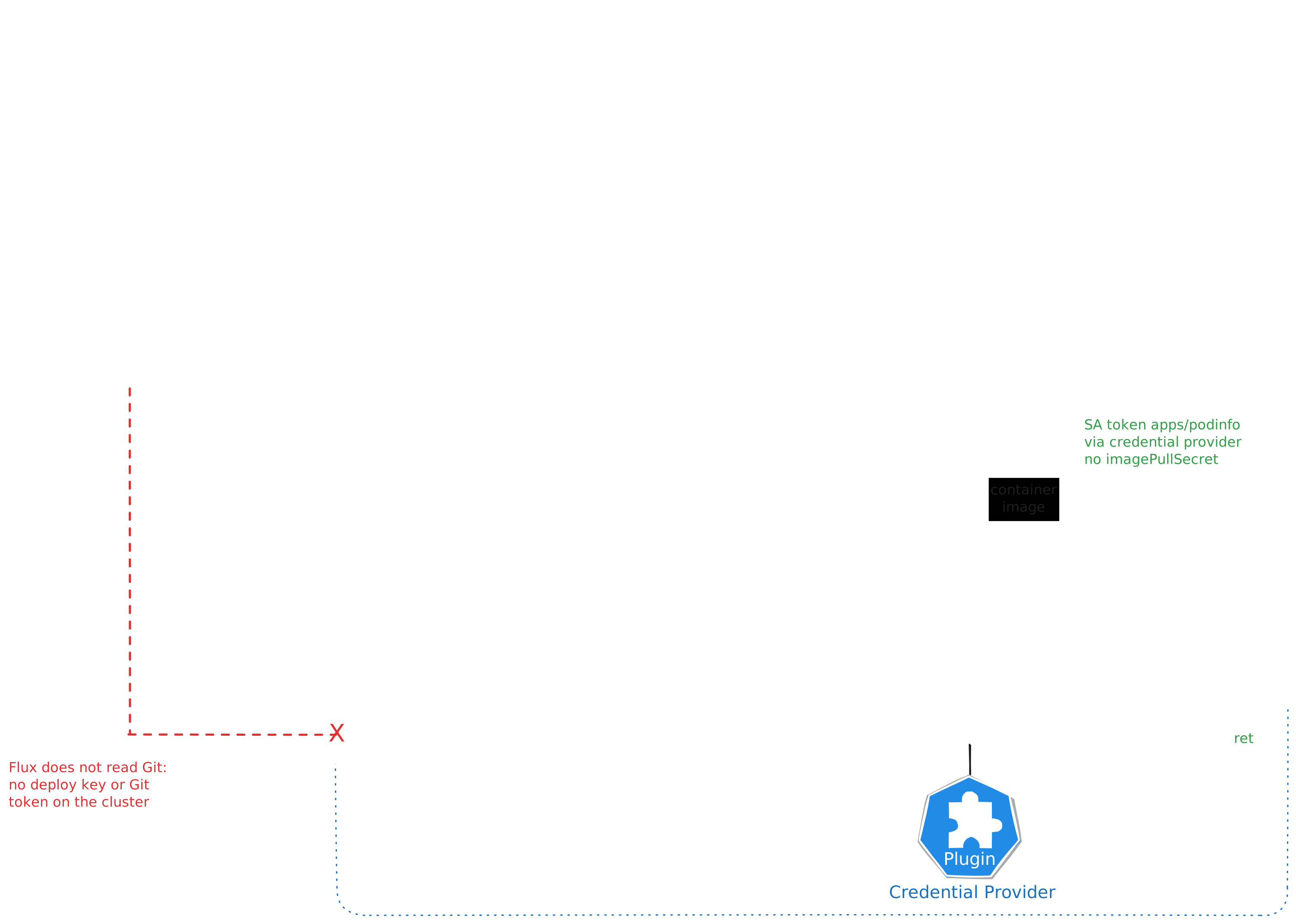
Git stays where people review and merge changes, but Flux no longer reads from it. CI packages the manifests with flux push artifact and Flux reconciles from an OCIRepository instead of a GitRepository. The cluster holds no Git deploy keys or tokens. The registry is used twice: Flux pulls the manifests, and the kubelet pulls the images they reference. Both pulls usually need a secret, a secretRef on the OCIRepository and an imagePullSecret on the workload. This post shows that this isn’t needed.
In June we showed keyless push from CI and keyless pull on the kubelet. The missing piece was Flux itself: it could only use workload identity against the hyperscaler registries (ECR, ACR, Google Artifact Registry). Every other OCI registry, Harbor included, still needed a static secret. Flux 2.10 closes that gap and now the generic provider can authenticate with a Kubernetes ServiceAccount token. Harbor accepts exactly that token, so Flux and the registry now speak the same language.

Source-controller v1.10.0, kustomize-controller v1.10.0, image-reflector-controller v1.3.0, Kubernetes v1.35.5 (k3s), Harbor 2.15.x.

Runnable example: the manifests from this post, the controller RBAC grant and a troubleshooting table are in examples/flux of the harbor-workload-identity-federation repository.
Two Pulls, Two Identities
The trick is that each pull uses its own Kubernetes identity, and 8gcr maps each identity to its own robot account.
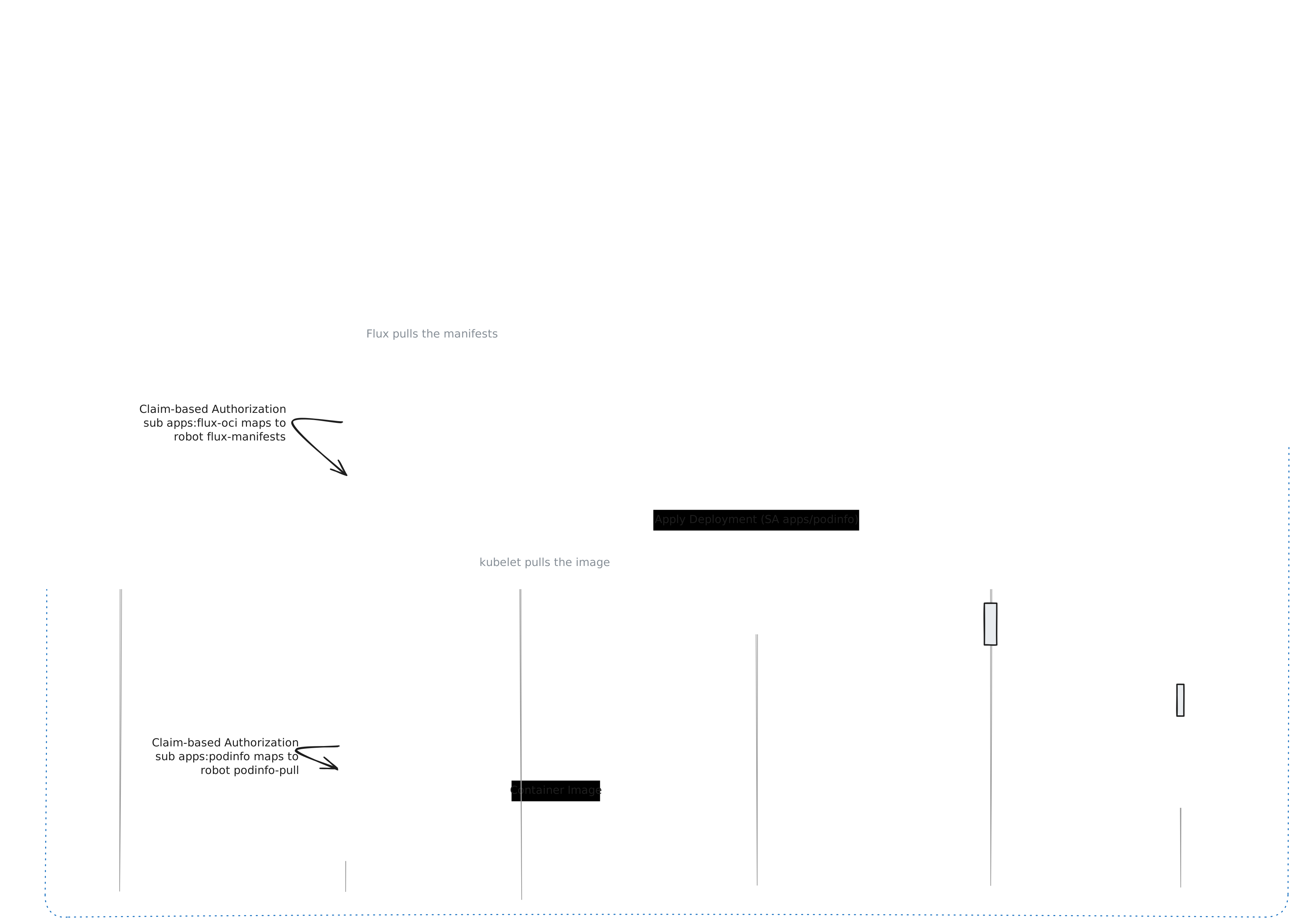
- Flux pulls the manifests. source-controller asks the API server for a token for the ServiceAccount named on the
OCIRepository, and sends it to the registry. - The kubelet pulls the images. The Harbor credential provider asks for a token for the pod’s ServiceAccount, and the kubelet uses it as the registry password (KEP-4412).
- 8gcr tells them apart. Both tokens come from the same issuer with the same audience, but their
subclaim differs. Eachsubmaps to a robot with exactly the permissions it needs, and the audit log shows which one pulled what.
Step 1: Trust the Cluster in 8gcr
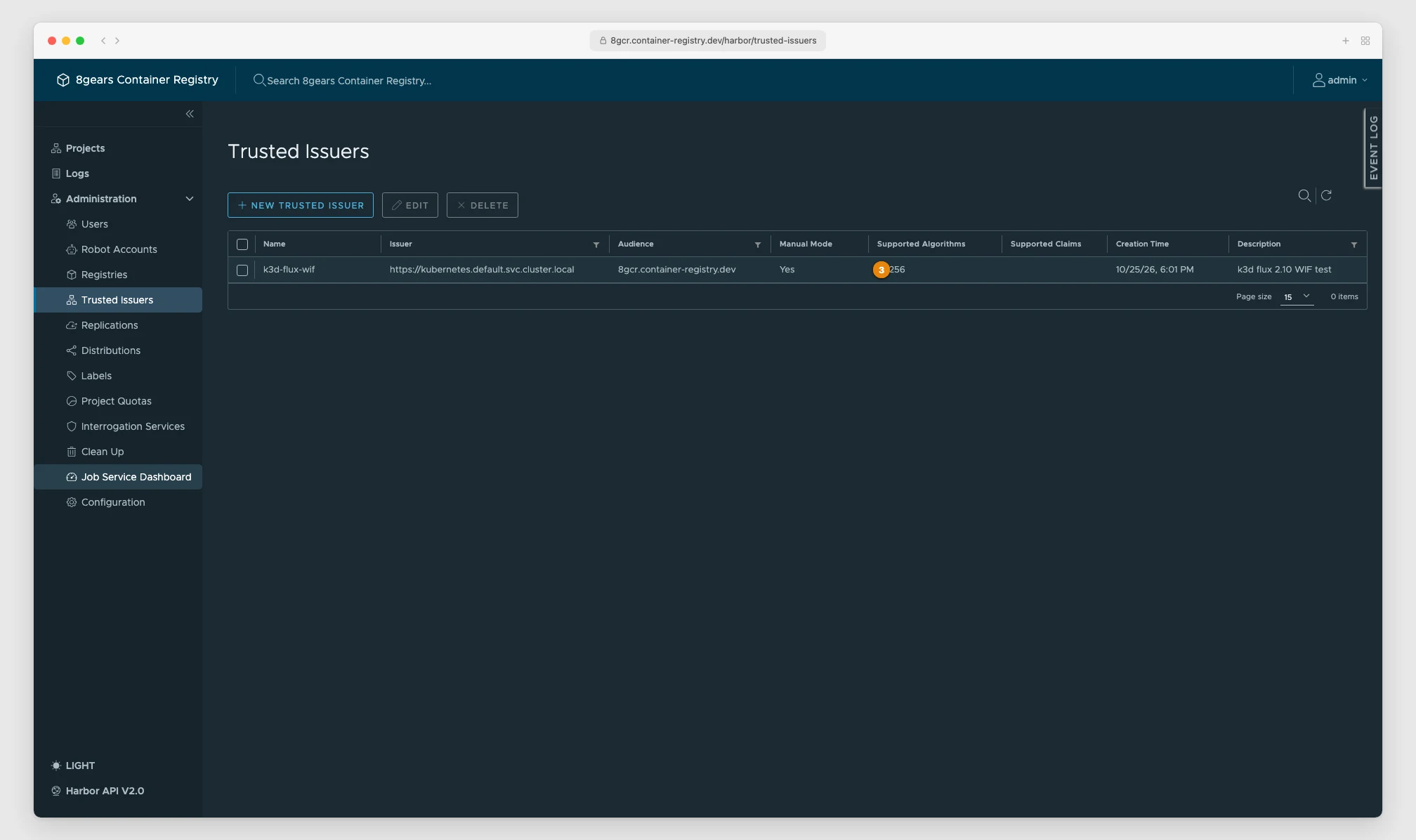
8gcr needs to know the cluster’s token issuer, the audience its tokens will carry, and the keys that sign them. Flux uses the registry hostname as the default audience, so use that as the audience and you do not need to configure one in Flux at all.
If your cluster’s issuer is publicly reachable (EKS, GKE and AKS may publish theirs), register it in online mode and 8gcr fetches the keys and follows key rotation by itself:
curl -u admin:$HARBOR_PASSWORD -X POST https://acme.container-registry.com/api/v2.0/trusted-issuers \
  -H 'Content-Type: application/json' \
  -d '{
    "name": "prod-cluster",
    "openid_config_url": "https://oidc.example.com/.well-known/openid-configuration",
    "audience": "acme.container-registry.com"
  }'
A k3s, k3d or kubeadm cluster usually keeps the default issuer https://kubernetes.default.svc.cluster.local, which nothing outside the cluster can reach. Register it in offline mode and paste the keys in:
kubectl get --raw /openid/v1/jwks > jwks.json

jq -n --slurpfile jwks jwks.json '{
    name: "k3d-cluster",
    issuer: "https://kubernetes.default.svc.cluster.local",
    audience: "acme.container-registry.com",
    offline_validation: true,
    jwks_keys: $jwks[0]
  }' |
curl -u admin:$HARBOR_PASSWORD -X POST https://acme.container-registry.com/api/v2.0/trusted-issuers \
  -H 'Content-Type: application/json' -d @-
8gcr identifies a trusted issuer by issuer plus audience. Two clusters that both keep the default issuer and use the same registry audience cannot be told apart. Give production clusters a unique --service-account-issuer, ideally a public one, so online mode works. In offline mode a rebuilt cluster has new signing keys: re-export /openid/v1/jwks and update the trusted issuer with PUT /api/v2.0/trusted-issuers/{id}.
Step 2: One Robot per Identity
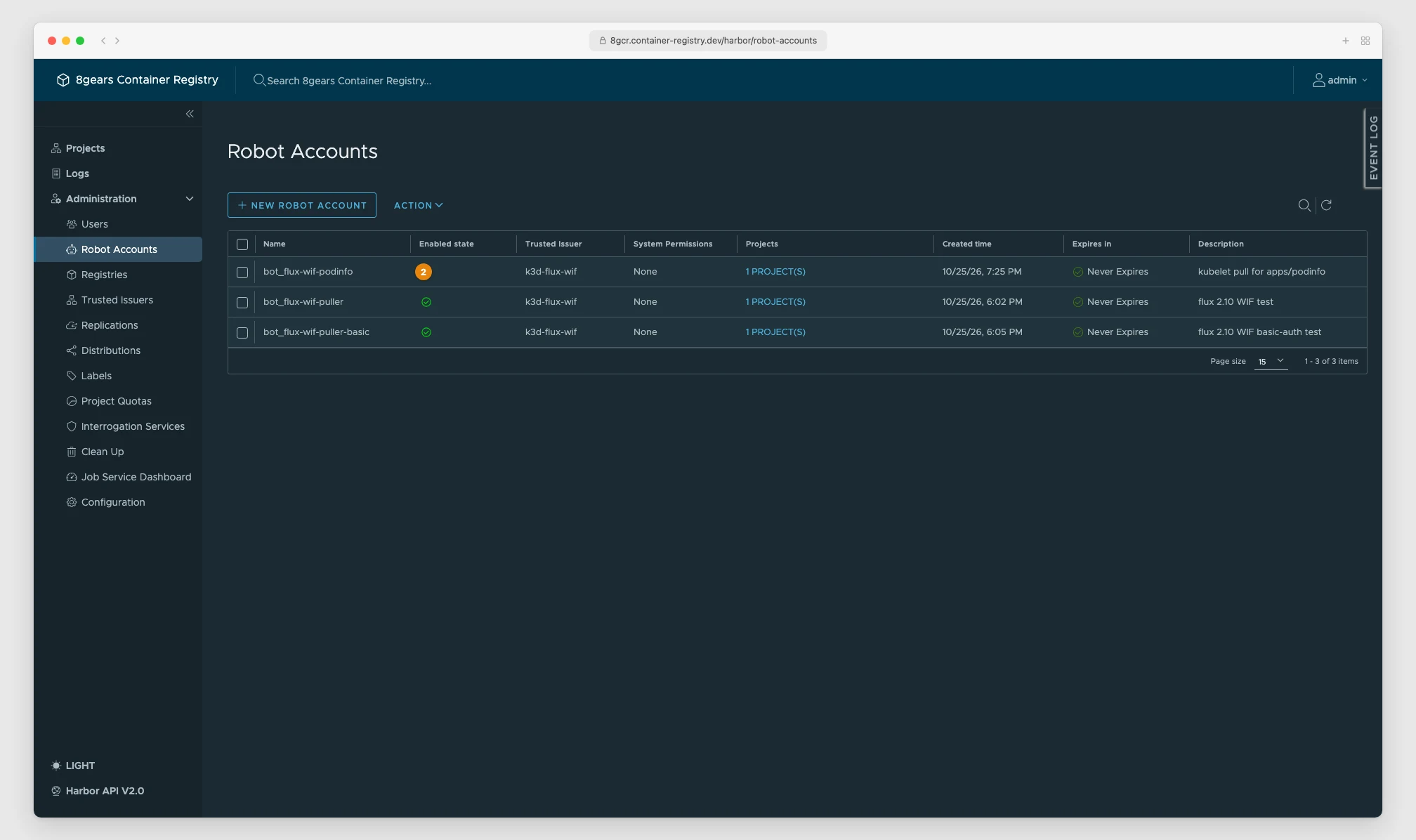
Create a federated robot for each identity and attach a claim rule on sub. A federated robot has no secret; the response to the create call simply contains none.
# Robot for Flux: pull manifests from the "platform" project
curl -u admin:$HARBOR_PASSWORD -X POST https://acme.container-registry.com/api/v2.0/robots \
  -H 'Content-Type: application/json' \
  -d '{
    "name": "flux-manifests",
    "level": "system",
    "duration": -1,
    "trusted_issuer_id": 6,
    "permissions": [{
      "kind": "project", "namespace": "platform",
      "access": [{"resource": "repository", "action": "pull"}]
    }]
  }'
# -> {"id": 21, "name": "bot_flux-manifests", ...}

# Only the Flux ServiceAccount may act as robot 21
curl -u admin:$HARBOR_PASSWORD -X POST \
  https://acme.container-registry.com/api/v2.0/trusted-issuers/6/claims \
  -H 'Content-Type: application/json' \
  -d '{"rules": [{"claim_path": "sub", "value": "system:serviceaccount:apps:flux-oci", "robot_id": 21}]}'
Repeat for the workload, for example robot podinfo-pull with sub = system:serviceaccount:apps:podinfo. A ServiceAccount that has no claim rule gets 401 from the registry, which is what you want.
Step 3: Configure Flux 2.10
The complete manifests for this step are in examples/flux.
Let the controllers mint tokens
Flux 2.10 graduates object-level workload identity, now called object identity. It also hardens the default RBAC: the controllers can no longer create ServiceAccount tokens (fluxcd/flux2#6139). Without a grant, the OCIRepository fails with:
failed to create kubernetes token for service account 'apps/flux-oci': serviceaccounts "flux-oci" is forbidden:
User "system:serviceaccount:flux-system:source-controller" cannot create resource "serviceaccounts/token"
in API group "" in the namespace "apps"
Grant it to the controllers that talk to the registry. source-controller pulls OCIRepository artifacts; image-reflector-controller scans tags for image automation. kustomize-controller and helm-controller still run as cluster-admin and need nothing.
apiVersion: rbac.authorization.k8s.io/v1
kind: ClusterRole
metadata:
  name: flux-object-identity
rules:
  - apiGroups: [""]
    resources: ["serviceaccounts/token"]
    verbs: ["create"]
---
apiVersion: rbac.authorization.k8s.io/v1
kind: ClusterRoleBinding
metadata:
  name: flux-object-identity
roleRef:
  apiGroup: rbac.authorization.k8s.io
  kind: ClusterRole
  name: flux-object-identity
subjects:
  - kind: ServiceAccount
    name: source-controller
    namespace: flux-system
  - kind: ServiceAccount
    name: image-reflector-controller
    namespace: flux-system
Opt the ServiceAccount in
For the generic provider, object identity is opt-in per ServiceAccount. Both annotations are required:
apiVersion: v1
kind: ServiceAccount
metadata:
  name: flux-oci
  namespace: apps
  annotations:
    credential.auth.fluxcd.io/provider: kubernetes
    credential.auth.fluxcd.io/type: jwt
Without them Flux does not report an error. It falls back to the ServiceAccount’s imagePullSecrets, or to anonymous access, and a private 8gcr project answers 401 UNAUTHORIZED. If you see a 401 and no token-related message, check the annotations first.
Two optional annotations exist. credential.auth.fluxcd.io/audiences overrides the default audience (the registry host), and credential.auth.fluxcd.io/username switches from a Bearer token to Basic auth with the token as the password. 8gcr accepts both forms.
Point the OCIRepository at 8gcr
apiVersion: source.toolkit.fluxcd.io/v1
kind: OCIRepository
metadata:
  name: apps
  namespace: apps
spec:
  interval: 1m
  url: oci://acme.container-registry.com/platform/apps
  ref:
    tag: v1
  provider: generic
  serviceAccountName: flux-oci
---
apiVersion: kustomize.toolkit.fluxcd.io/v1
kind: Kustomization
metadata:
  name: apps
  namespace: apps
spec:
  interval: 5m
  prune: true
  wait: true
  path: ./
  sourceRef:
    kind: OCIRepository
    name: apps
No secretRef. The artifact itself is pushed the usual way, for example from CI with keyless push as described in the June post:
flux push artifact oci://acme.container-registry.com/platform/apps:v1 \
  --path=./deploy --source="$(git config --get remote.origin.url)" --revision="$(git rev-parse HEAD)"
Image automation works the same way
ImageRepository gets the same treatment in Flux 2.10. Same ServiceAccount, same robot:
apiVersion: image.toolkit.fluxcd.io/v1
kind: ImageRepository
metadata:
  name: podinfo
  namespace: apps
spec:
  interval: 5m
  image: acme.container-registry.com/platform/podinfo
  provider: generic
  serviceAccountName: flux-oci
The robot needs pull on the repository to list its tags. image-automation-controller only writes to Git, so it needs no registry access.
Step 4: Keyless Image Pulls for the Workloads
Flux now deploys a Deployment whose image lives in the same private project. The pod has no imagePullSecrets, only a ServiceAccount:
apiVersion: v1
kind: ServiceAccount
metadata:
  name: podinfo
  namespace: apps
---
apiVersion: apps/v1
kind: Deployment
metadata:
  name: podinfo
  namespace: apps
spec:
  selector:
    matchLabels:
      app: podinfo
  template:
    metadata:
      labels:
        app: podinfo
    spec:
      serviceAccountName: podinfo
      containers:
        - name: podinfo
          image: acme.container-registry.com/platform/podinfo:6.15.0
The kubelet gets its token through the Harbor credential provider. Install it with the Helm chart, which writes the kubelet config, the node-audience RBAC and, on k3s, the config drop-in:
helm upgrade --install harbor-credential-provider \
  oci://8gears.container-registry.com/8gcr/harbor-credential-provider \
  --namespace kube-system \
  --set profile=k3s \
  --set registry.host=acme.container-registry.com
The Kubernetes Workloads guide covers the other profiles (kubeadm, EKS, kind, Talos).
Verify
Flux reports the artifact and the kubelet pulls the image without any secret:
$ kubectl -n apps get ocirepository,kustomization,pods
NAME                                          READY   STATUS
ocirepository.source.toolkit.fluxcd.io/apps   True    stored artifact for digest 'v1@sha256:6d341afa...'
kustomization.kustomize.toolkit.fluxcd.io/apps  True  Applied revision: v1@sha256:6d341afa...
pod/podinfo-5fbbdf9c7f-7m5qg                  1/1     Running

$ kubectl -n apps get pod -l app=podinfo -o jsonpath='{.items[0].spec.imagePullSecrets}'
(empty)
The 8gcr audit log (GET /api/v2.0/auditlog-exts) shows each pull under its own robot:
bot_podinfo-pull     pull  platform/podinfo@sha256:ec73780a...
bot_flux-manifests   pull  platform/apps@sha256:6d341afa...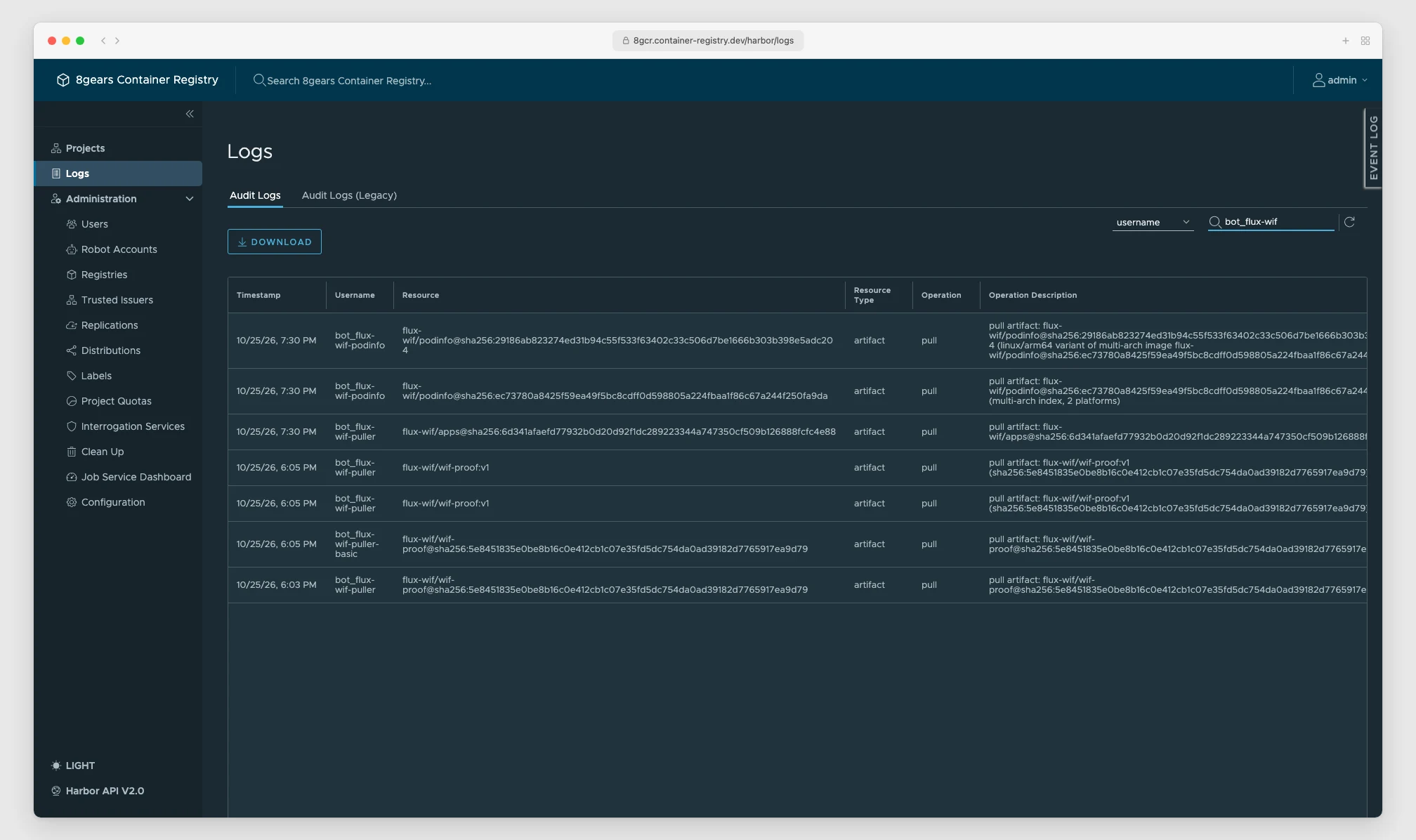
That attribution is the point. If a token leaks, it is valid for minutes and maps to one robot with read access to one project.
Troubleshooting
| Symptom | Cause | Fix |
|---|---|---|
cannot create resource "serviceaccounts/token" | Flux 2.10 default RBAC | Bind the serviceaccounts/token create ClusterRole to the controller |
audience '...' is not allowed as it is intended for the local kubernetes cluster | Registry listed in --api-audiences | Remove it; rely on the node-audience RBAC |
UNAUTHORIZED: unauthorized to access repository ... action: pull, no token error | ServiceAccount not opted in | Add both credential.auth.fluxcd.io/provider and /type annotations |
UNAUTHORIZED ... action: pull with annotations present | No claim rule for this sub, wrong audience, or stale JWKS | Check the claim rules, the trusted issuer’s audience and its keys |
403 project-level federated robot accounts feature is not enabled | Project-level robots are off | Enable enable_project_federated_robot_accounts, or use a system-level robot |
| Only one ServiceAccount can pull, all others get 401 | A claim rule was saved without a robot, so it applies to every token from the cluster | List the rules with GET /api/v2.0/trusted-issuers/{id}/claims, delete the one without a robot_id, re-add it with the robot’s ID |
Why This Matters
A GitOps cluster used to hold at least two long-lived registry credentials: one for Flux and one per namespace for the image pulls. Both had to be created, distributed, rotated and kept out of Git. With Flux 2.10 and 8gcr the cluster holds none. What remains is configuration that is safe to commit: which issuer 8gcr trusts, and which ServiceAccount maps to which robot.
Together with keyless push from CI, the whole path from commit to running pod now works without a single static registry secret.
Run keyless GitOps on 8gears Container Registry.
8gears Container Registry is a Harbor-based container registry as a service with Federated Robot Accounts built in. Start free and scale up with flexible plans.
Discover our offer