P2P Preheat distribution
Preheating pushes an image to a peer-to-peer network before a large rollout, so nodes pull it from each other instead of all at once from the registry. This page shows the system administrator how to register the provider instance that makes preheating possible, then hands off to the project manager who uses it.

Two roles, two steps
- The system administrator registers a provider instance on the Distributions page — this page covers that step.
- The project manager then selects that instance in a project’s P2P Preheat policy. For that step, see Preheat Images.
A project cannot preheat until an administrator has registered at least one instance.
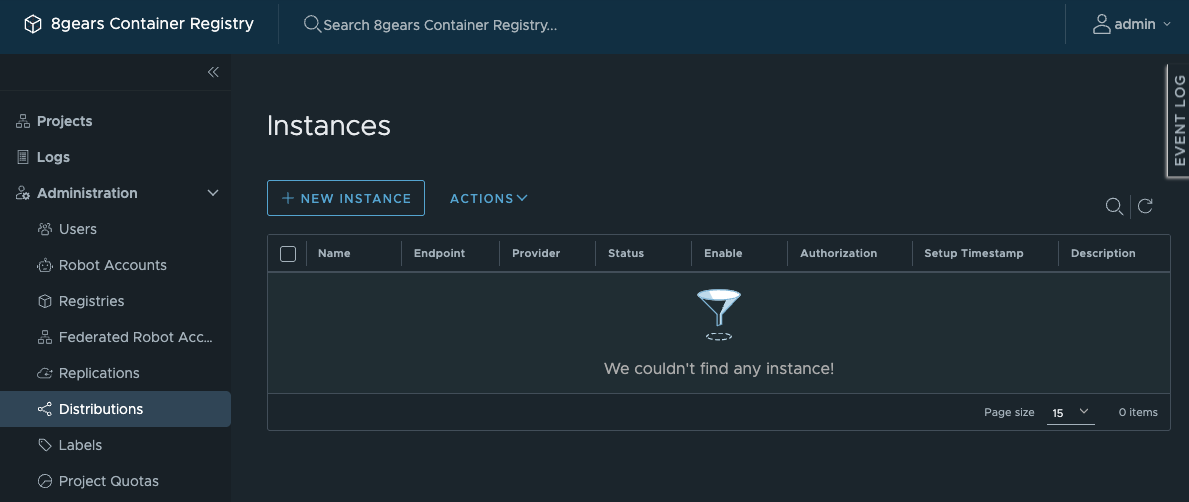
Open Distributions
- Expand Administration in the navigation pane;
- Click Distributions.
The page is titled Instances and lists every provider you have registered, with its Name, Endpoint, Provider, Status, whether it is enabled, its Authorization, Setup Timestamp, and Description.
Register a provider instance
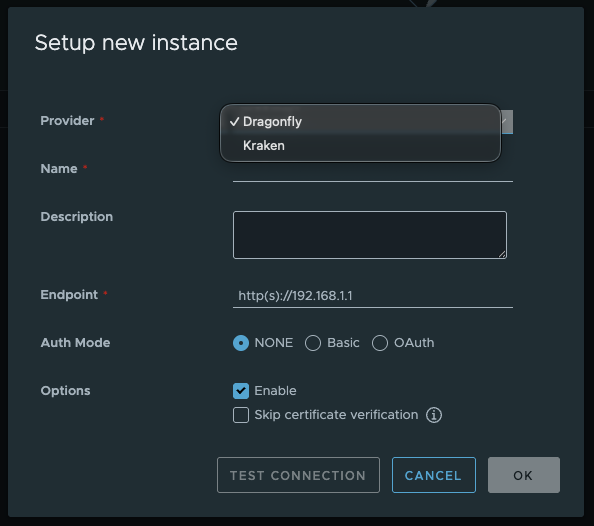
- Click NEW INSTANCE;
- Fill in the setup form:
- Provider — choose Dragonfly or Kraken, the two supported P2P providers;
- Name — a name for the instance;
- Description — optional;
- Endpoint — the provider’s address, for example
http(s)://192.168.1.1; - Auth Mode — NONE, Basic, or OAuth, matching how the provider authenticates;
- Enable — leave checked to make the instance available to projects;
- Skip certificate verification — check only if the endpoint uses a certificate you do not need verified.
- Click TEST CONNECTION to confirm the endpoint answers;
- Click OK to save, or CANCEL to discard.
Manage instances
Select an instance in the Instances list to work with it. The ACTIONS dropdown then offers three operations:
- EDIT — change the instance’s settings;
- DEACTIVATE — stop projects from using the instance without deleting it;
- DELETE — remove the instance.
The three entries stay greyed until you select an instance — that is expected, not a fault.
Hand off to the project
Once an instance is enabled, a project manager can select it when creating a P2P Preheat policy in the project’s P2P Preheat tab. See Preheat Images.