Configure Audit Logging
Audit logs record who acted on the registry and what they changed. This page shows you how to choose which events are recorded, forward those logs to a syslog endpoint, and stop writing them to the database. You set all three on the Audit Log configuration page.
Open the Audit Log settings
- Sign in as a system administrator.
- Go to Administration > Configuration.
- Open the Audit Log tab.
The Audit Log tab sits next to Authentication, Security, and System Settings. In earlier releases these settings were on the System Settings tab. They now have their own tab.
Choose which events are recorded
The Event Recording matrix controls which events Container Registry records. Each row is a resource type. Each column is an action. Each cell is one event type, such as an artifact pull or a project deletion.
The resource types are Users, Project Members, Robots, Artifacts, Projects, Configuration, and Repositories. The actions are the operations that apply to each resource, such as create, update, delete, pull, and login.
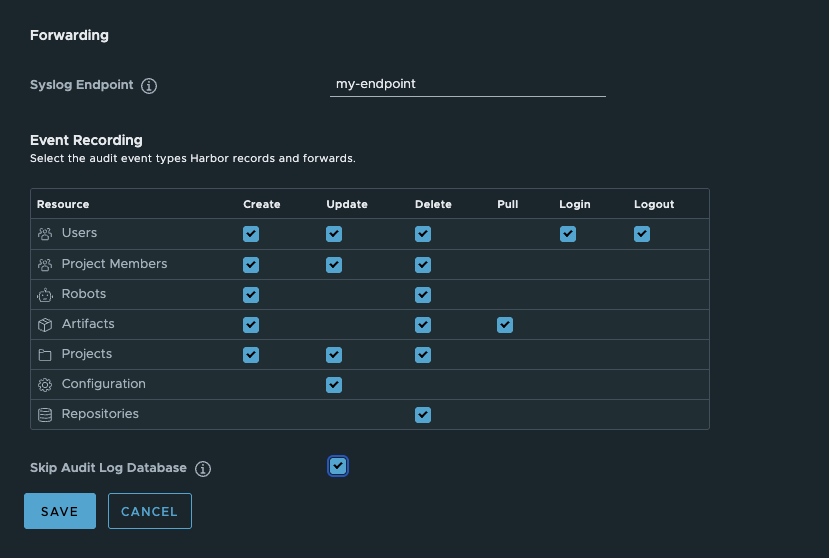
- A checked box records that event type.
- Clear a box to stop recording that event type.
By default every box is checked, so Container Registry records every event type.
To change what is recorded:
- Check or clear the boxes for the event types you want.
- Click SAVE.
Forward audit logs to a syslog endpoint
Forward audit logs to an external syslog endpoint to collect them outside the registry.
- In Audit Log Forward Syslog Endpoint, enter the endpoint. Use the
host:portform, for exampleharbor-log:10514. - Click SAVE.
Container Registry then sends each audit log entry to that endpoint.
Stop writing audit logs to the database (optional)
By default Container Registry writes every audit log entry to its database. If you forward audit logs to a syslog endpoint, you can stop writing them to the database as well.

Skip the database only when you forward audit logs to a syslog endpoint. If you skip the database without forwarding, the audit log is lost.
- Set an endpoint in Audit Log Forward Syslog Endpoint first. Skip Audit Log Database stays disabled until you do.
- Check Skip Audit Log Database.
- Click SAVE.
Container Registry then forwards audit logs to the endpoint only, and does not store them in its database.
Verify
- Reopen the Audit Log tab and confirm each field holds the value you set.
- If you forward to a syslog endpoint, perform an action such as pushing an artifact, then confirm the entry arrives at the endpoint.
To read the recorded audit logs in the web console, see Working With Logs.