Kubernetes Workloads
A pipeline can run docker login with its own token. A pod cannot: by the time the container would run, the image has to be on the node already, and the kubelet is what pulled it. So on Kubernetes the token has to reach the kubelet, and that is what the harbor-credential-provider plugin does.
Once it is installed, pods pull from Container Registry with no imagePullSecret in the manifest, no secret in the namespace, and nothing to copy when a new namespace appears.
How It Works
Kubernetes 1.34 lets the kubelet request a service account token with a chosen audience and hand it to an image credential provider (KEP-4412). harbor-credential-provider is such a provider. It receives the token and returns it as basic auth credentials, username jwt, password the token.
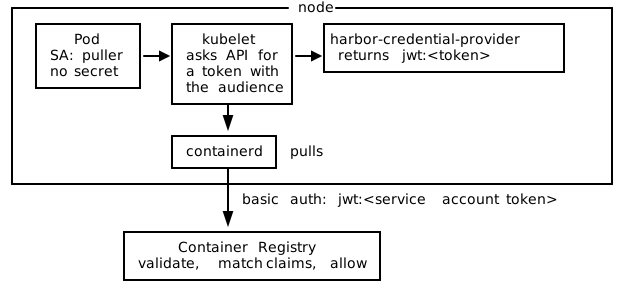
The pod needs nothing: no projected volume, no annotation, no change to its service account. It only has to run under a service account whose token satisfies the claim rules on a federated robot account.
Requirements
- Kubernetes 1.34 or newer. The kubelet support landed there. On 1.33 the feature gates
KubeletServiceAccountTokenForCredentialProvidersandServiceAccountNodeAudienceRestrictionexist but have to be turned on explicitly, and the chart refuses to install below 1.34, so there the binary and its config go on by hand. - Nodes you can write to. The installer copies a binary onto the host and restarts the kubelet. GKE Autopilot does not allow that, and neither does OpenShift without a MachineConfig.
- Nodes allowed to ask for your audience. The kubelet asks the API server for a token whose audience is the registry hostname, and the API server issues one only if the node holds
request-serviceaccounts-token-audienceon that audience. The chart creates that RBAC, so there is nothing else to set up unless you turn it off. The audience does not belong in the API server’s--api-audiences: that flag lists what the API server accepts on tokens presented back to it, so adding your registry there would make a token minted for the registry work as a cluster credential too. - The registry side already set up: a connected identity provider for the cluster issuer, and a federated robot account with pull permission whose rules match the cluster’s tokens.
Check the node audience RBAC. The kubelet’s token request is authorized as the node, so ask as a node:
kubectl auth can-i request-serviceaccounts-token-audience harbor.example.com \
  --as=system:node:<node-name> --as-group=system:nodes
kubectl warns about an unknown resource type and an unknown verb; the answer on the last line is what counts. no means the API server will refuse the kubelet, and no amount of correct node setup will help. It turns to yes once the chart is installed, or once you have applied the RBAC yourself. kubectl create token --audience=... run as yourself is no substitute: it is authorized as you, not as the node, so it succeeds either way.
Set Up the Registry Side
Find the cluster’s issuer:
kubectl get --raw /.well-known/openid-configuration | jq -r .issuerIf that issuer is reachable from Container Registry, as it is on EKS and GKE, connect the provider in discovery mode. If it is not, as on a private or local cluster, use manual mode and paste the key set:
kubectl get --raw "$(kubectl get --raw /.well-known/openid-configuration | jq -r .jwks_uri)"Then create a federated robot account with pull permission and a rule on the subject of the service account your pods run as:
sub = system:serviceaccount:<namespace>:<service-account>For the default service account in the default namespace that is system:serviceaccount:default:default.
Install the Plugin
The plugin ships as a privileged DaemonSet. On each node it copies the binary onto the host, writes the kubelet credential provider config, points the kubelet at it, and restarts the kubelet. Because it is a DaemonSet, a node that joins later is set up when its pod starts, which is what keeps a scaling node pool working.
helm upgrade --install harbor-credential-provider \
  oci://8gears.container-registry.com/8gcr/harbor-credential-provider \
  --namespace kube-system \
  --set profile=generic \
  --set registry.host=harbor.example.com \
  --set registry.audience=harbor.example.com

kubectl rollout status daemonset/harbor-credential-provider -n kube-system
registry.host is the only required value. registry.audience defaults to it, and has to be the same string as the audience on the connected provider.
Profiles
The profile decides where the binary and the config go, and how the kubelet is told about them. Distributions disagree about that last part more than about anything else, and it is the part that decides whether any of this works.
| Profile | Nodes | Binary directory | Config |
|---|---|---|---|
generic | kubeadm and other systemd nodes | /usr/local/bin/credential-providers | /etc/kubernetes/credential-providers/config.yaml |
eks, aws | EKS on AL2023. Keeps the existing ECR provider entry | /etc/eks/image-credential-provider | /etc/eks/image-credential-provider/config.json |
k3s, k3d | k3s and k3d | /var/lib/rancher/credentialprovider/bin | /var/lib/rancher/credentialprovider/config.yaml |
rke2 | RKE2 server and agent nodes | /var/lib/rancher/credentialprovider/bin | /var/lib/rancher/credentialprovider/config.yaml |
kind | kind node containers | /var/lib/kubelet/credential-provider | /var/lib/kubelet/credential-provider-config.yaml |
gke | GKE Standard, best effort | same as generic | same as generic |
aks | AKS. Patches KUBELET_FLAGS in /etc/default/kubelet | same as generic | same as generic |
microk8s | MicroK8s. Edits the snap’s kubelet arguments file | /var/snap/microk8s/common/credentialprovider/bin | /var/snap/microk8s/common/credentialprovider/config.yaml |
sks | Exoscale SKS. Replaces the ExecStart from sks.conf with its own drop-in | same as generic | same as generic |
custom | Anything else | credentialProvider.binDir | credentialProvider.configPath |
Check It Took
Installing the files is not the same as the kubelet using them. The two flags have to be on the live kubelet, and verify-node-install.sh in the repository checks every node:
./scripts/verify-node-install.sh            # every node
./scripts/verify-node-install.sh node-1     # one node
Then pull something. A pod with no imagePullSecrets, running under a service account your claim rules match, pointed at an image that exists in your registry:
kubectl run pull-test \
  --image=harbor.example.com/library/nginx:latest \
  --restart=Never
Per-Distribution Notes

The paths and mechanisms below come from each distribution’s own documentation and from the installer source. kind is the one that has been run end to end on a live cluster. Treat the rest as accurate about where a kubelet reads its arguments, and verify on a test node before a production rollout.
kubeadm and other systemd nodes. The default. The installer writes a drop-in setting KUBELET_EXTRA_ARGS, which the kubeadm unit expands. If /usr/local is read-only or mounted noexec on your node image, switch to profile=custom and point at a directory that is neither.
Amazon EKS. The easiest case. The AL2023 image already runs the kubelet with the credential provider flags, so the kubelet unit is left alone and the plugin’s entry is merged into the existing config.json. That file already has an ecr-credential-provider entry that the AWS add-ons pull through, and the installer preserves it. AL2 nodes keep their credential provider elsewhere; use profile=custom there.
GKE Standard. Node auto-upgrade, auto-repair and any pool resize replace the node, and the replacement comes up without the binary. The DaemonSet reinstalls when its pod lands, so the node heals, but pulls fail in the gap. Node image matters too: on Container-Optimized OS /usr is read-only and noexec, so the binary has to go under /home/kubernetes/bin with profile=custom. A cluster running both Ubuntu and COS pools needs two releases with different names and matching node selectors, because one release cannot use two sets of paths. GKE Autopilot is out entirely.
k3s and k3d. The kubelet is embedded in the k3s process and its arguments come from /etc/rancher/k3s/config.yaml.d/, which the installer writes. Nothing goes in kube-apiserver-arg for this, and in particular the audience does not go in --api-audiences. Do not expect the provider flags to show up in ps either; k3s passes them to its embedded kubelet internally.
kind. Files land inside the node container, and nothing has to be passed at cluster creation. The wrinkle: the node’s kubelet unit does not always expand $KUBELET_EXTRA_ARGS, so the drop-in is written and has no effect. Check the live command line inside the node container, and if the flags are missing, reinstall with --set kubelet.forceExecStartOverride=true, which rewrites ExecStart instead. Pulls failing with no basic auth credentials while those flags are absent means the kubelet never called the plugin at all.
Talos Linux. The chart does not apply. The binary ships as a system extension and the kubelet is wired through machine config, which is how an immutable distribution expects a node file to arrive. The repository has a worked example.
AKS, RKE2 and MicroK8s. None of these reads the drop-in that generic writes, so each has its own profile in the published chart. AKS builds its kubelet command line from KUBELET_FLAGS in /etc/default/kubelet, and profile=aks patches that line. RKE2 runs the kubelet inside rke2-server or rke2-agent and reads kubelet-arg from its own config directory, so profile=rke2 writes /etc/rancher/rke2/config.yaml.d/99-harbor-credential-provider.yaml and asks systemd which of the two units the node runs. MicroK8s keeps one argument per line in a snap-owned file, and profile=microk8s edits /var/snap/microk8s/current/args/kubelet while keeping the binary under /var/snap/microk8s/common, which survives a snap refresh. The aks and microk8s installs fail when the file they edit is missing, rather than reporting success on a node they did not change. One thing to know in advance: on MicroK8s a snap refresh rewrites the arguments file and quietly takes the flags with it.
OpenShift. Not supported. RHCOS is managed by rpm-ostree, the kubelet belongs to the Machine Config Operator, and KubeletConfig does not expose the two flags, so a working setup means a MachineConfig with an Ignition payload and a node reboot. The repository’s OpenShift page explains what that would take. Image pull secrets still work there in the meantime.
Upgrading and Uninstalling
kubectl rollout status means what it says on an upgrade too. A pod reports ready only once its own installer has finished and the kubelet restart has returned: the installer deletes the node’s marker file when it starts and rewrites it with this release’s install ID at the end, and the readiness probe looks for that ID. The installer logs show what happened on each node:
kubectl logs -n kube-system -l app.kubernetes.io/name=harbor-credential-provider --tail=20helm uninstall removes the DaemonSet, the service account and the RBAC. It does not undo what was written on the nodes. The binary, the config and the kubelet drop-in stay, and the kubelet keeps calling the plugin. Remove those by hand, or with a one-shot job, before calling a node clean.
Next
- Troubleshooting Federated Robot Accounts.
- The component, the installer and the per-distribution examples live in harbor-workload-identity-federation.