The Artifact List
The artifact table shows quite a lot of information. This page explains every column, so you can tell what each entry means.
Overview of the Stored Images/Artifacts
The overview table has the following columns:
Artifacts.
Pull Command: when you click on the copy icon next to an artifact, the pull command for this artifact will be copied to clipboard and can be used in your command line tool to pull the artifact. Example of the copied command:
docker pull your-subdomain.container-registry.com/library/test@sha256:1b26826f602946860c279fce658f31050cff2c596583af237d971f4629b57792Since there are different types of artifacts stored in repositories, they are all referred to using their SHA256 hashes.
- Tags. Read more about Docker image tags here.
Some artifacts can have multiple tags. Hover over the entry to display an overview of all tags or check them in the artifact view.

- Size. This column shows the size of the compressed artifact. When you pull it to your local machine, it will be decompressed to its original size again.
- Vulnerabilities. This column shows the results of the image scan if any scan has been run upon it. Hover over the entry to display all vulnerabilities or check them in the artifact view.
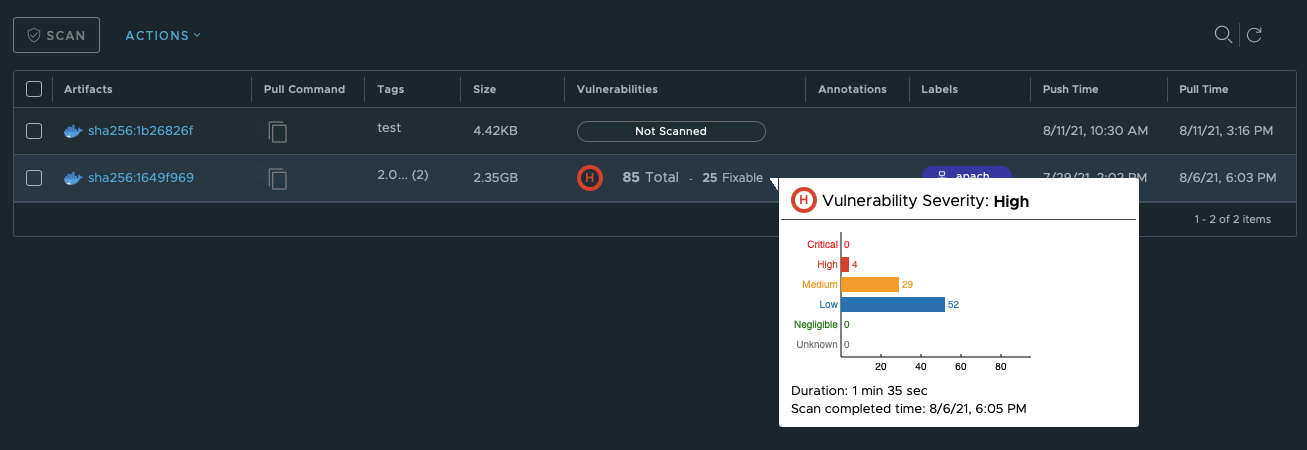
Annotation. This column displays additional information that was added to the image manifest. It can include:
- type of CPU architecture;
- architecture variant;
- operating system and, optionally, its versions and features.
Read more about setting images annotations here.
Labels shows labels that you or your project collaborators assigned to the artifact.
Push Time shows when the artifact was pushed for the last time.
Pull Time shows when the artifact was pulled for the last time.
Repository-Level Pull Command
In addition to the per-artifact pull commands in the table, a pull command for the entire repository appears on the top right of the Artifact List tab. This repository-level pull command lets you pull the repository without first selecting a specific artifact, which is useful when you want to pull the latest image or when you are sharing the pull command with others.
The command uses the following format:
<client> pull <registry>/<project>/<repository>You can select your container runtime from a dropdown next to the pull command. The command updates automatically to match your selection. Click the copy icon to copy the command to clipboard.
When the repository-level pull command is visible, the per-artifact pull command dropdowns in the table are hidden to avoid duplication.