Tag Immutability
A tag can be reused: push a new image with the same tag, and the tag points to the new image. Make the tag immutable, and Container Registry keeps it on the artifact it was first pushed with.
What Is Tag Immutability and Why You Need It
Harbor, the technology behind Container Registry, cannot (yet) deal with the situation when more than one image has the same tag. When there is an image in the registry with a certain tag, and then another image with the same tag is pushed to it, the first image loses its tag. The second image, pushed later, retains the tag but only until the next image with the same tag is pushed.
Thus, the very purpose of tags existence – helping to differentiate between images – becomes a bit meaningless since the images override each other. The reason behind this trouble is that, for now, Harbor cannot match tags and SHA256 hashes. Therefore, hashes remain the only reliable image reference.
To rehabilitate the tags, Harbor allows you to specify tag immutability rules, although they must be set manually for each tag that can be a subject to repetition. The immutability won’t allow an image with the same tag to be pushed into the repository. To be more precise, the policy is about a pair of an artifact and its tag.

If you add a tag into an immutability policy, you won’t be able to perform the following actions with this artifact from anywhere in the GUI or your command line tool:
- delete the tagged artifact completely;
- re-tag the artifact that is assigned the tag involved in the immutability policy;
- alter the tagged artifact through a replication from another target registry or in any other way.
You still can perform any operations with other tags assigned to the same artifact, even though the tags are attached to the same SHA256 hash/digest.
Create a Tag Immutability Policy
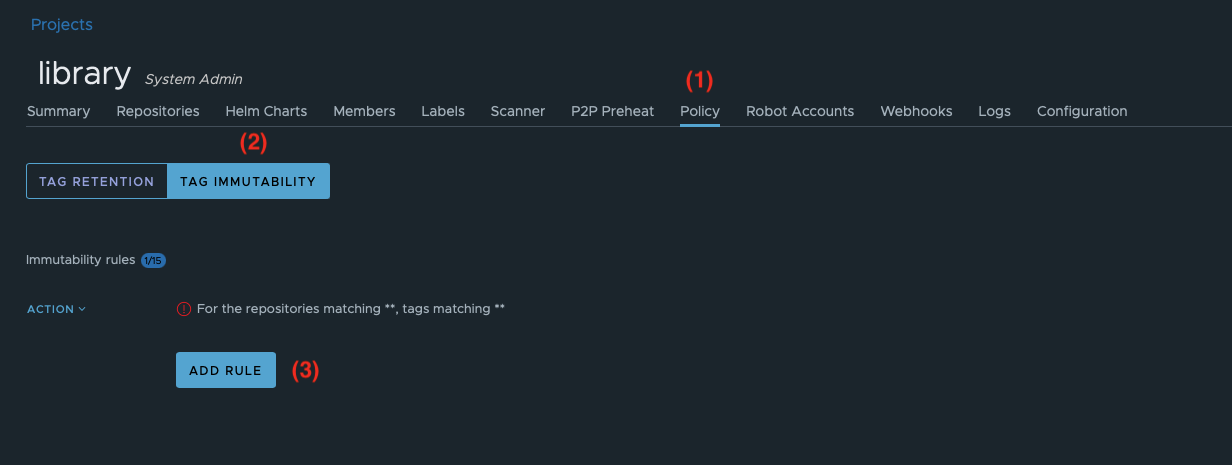
- Inside a project, go to the Policy tab;
- Switch to TAG IMMUTABILITY (2);
- Click ADD RULE (3);
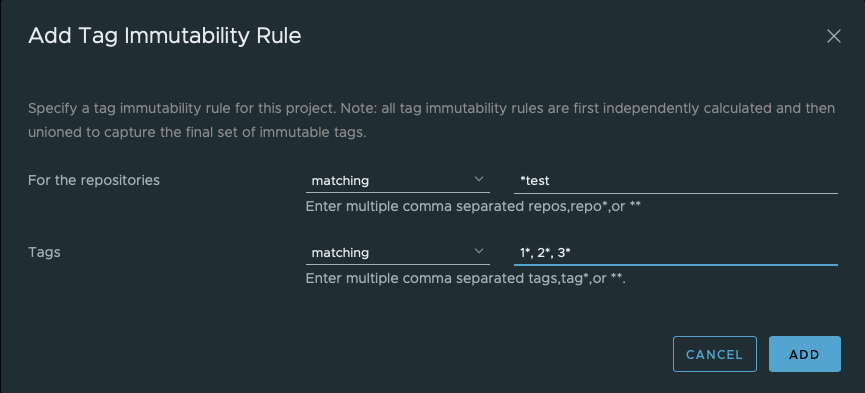
- To select repositories and tags, specify matching patterns as explained here;
Activity-Based Conditions
In addition to matching by repository and tag name patterns, immutability rules now support activity-based conditions. These let you protect tags based on how recently they were pushed or pulled, or by their position in a recency ranking. A condition is optional — when omitted, the rule protects all tags that match the repository and tag patterns.
The available conditions are:
| Condition | Description |
|---|---|
| Pushed within last N days | Protects tags whose most recent push occurred within the specified number of days. |
| Pulled within last N days | Protects tags whose most recent pull occurred within the specified number of days. |
| Most recently pushed # artifacts | Protects the N most recently pushed artifacts in the matching set. |
| Most recently pulled # artifacts | Protects the N most recently pulled artifacts in the matching set. |
These conditions work in combination with the repository and tag filters. All three filters — repository, tag, and condition — are applied together, and a tag must satisfy all of them to be covered by the rule.
Activity-based conditions use the same evaluator framework as tag retention rules, so the behavior is consistent between the two policy types. This also means immutability rules with activity-based conditions can coexist with retention policies: the retention policy will respect immutability protection and will not delete tags that are covered by an active immutability rule.
Manage Immutability Policies
You can edit, disable/enable, and delete a tag immutability rule using the Action button next to each rule.
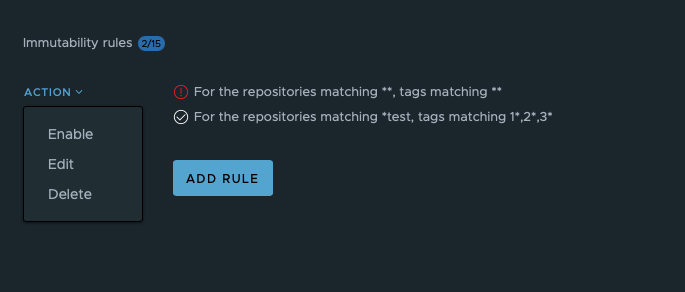 Disabled rules will be marked with a red exclamation mark.